There is a conversation that happens in millions of families every year. An adult child sits down with an aging parent and tries to explain why their current phone is not working for them anymore. The buttons are too small. The screen is too dim. The plan costs too much for what they actually use. The font is impossible to read. And somewhere in the middle of that conversation, the parent quietly admits they have been struggling with their phone for months but did not want to say anything because they did not want to be a burden.
This guide exists to end that conversation before it starts. The best phone plans and devices for seniors in 2026 are not complicated to find once you know what actually matters for older adults versus what the smartphone industry spends most of its marketing budget promoting. Older adults do not need the latest camera with computational photography. They need a phone that is easy to hold, easy to read, easy to hear, and connected to a plan that does not drain a fixed income with fees for features that never get used.
Everything in this guide is organized around that reality. We cover the phones that genuinely work for older adults, the plans that provide the best value for the way seniors actually use their phones, and the features that make the biggest difference in daily life for people who may be dealing with vision challenges, hearing difficulties, arthritis in their hands, or simply the entirely reasonable preference for a phone that does what they need without a manual.
Visit our website to view more new mobiles detailed Reviews:View Now
What Seniors Actually Need in a Phone
Before getting into specific recommendations, understanding what makes a phone genuinely suitable for older adults versus what is merely marketed toward them helps every decision in this guide make more sense.
The single most important factor in a senior-friendly phone is display size and readability. A 6.5 to 6.9 inch display at high brightness with adjustable font sizes covers most of the daily readability needs that make smaller phones frustrating for older eyes. Brightness matters more than resolution for most seniors — a 700 nit display that stays readable outdoors in daylight is more valuable than a crisp but dim panel.
Audio clarity during calls is the second most critical factor. Many seniors have some degree of hearing loss, and the difference between a phone with a strong, clear earpiece and one with a tinny or quiet speaker becomes apparent within the first call. Hearing aid compatibility ratings — listed as M and T ratings on US carrier websites — matter specifically for seniors who use hearing aids.
Physical handling is the third factor most guides overlook. Arthritis, reduced grip strength, and tremor make large flat phones difficult to hold securely. A phone with a textured back, reasonable weight, and not-too-thin profile is easier to handle than a sleek glass slab that slides off any surface. A fingerprint sensor on the side rather than under the display is significantly easier for older adults to use consistently.
Battery life matters more for seniors than most product reviews acknowledge. Older adults are less likely to remember to charge their phones daily and more likely to need their phone working in an emergency precisely when the battery has run down. A phone with a 5000 mAh or larger battery that comfortably lasts two days between charges removes a real daily anxiety.
Emergency features are genuinely life-safety considerations for seniors living alone or with limited mobility. Emergency SOS features that contact emergency services automatically, fall detection, and medical ID storage accessible from the lock screen can be the difference between a quick response and a delayed one in a genuine emergency.
Best Smartphones for Seniors in 2026
Apple iPhone 16 Plus — Best Overall Senior Smartphone
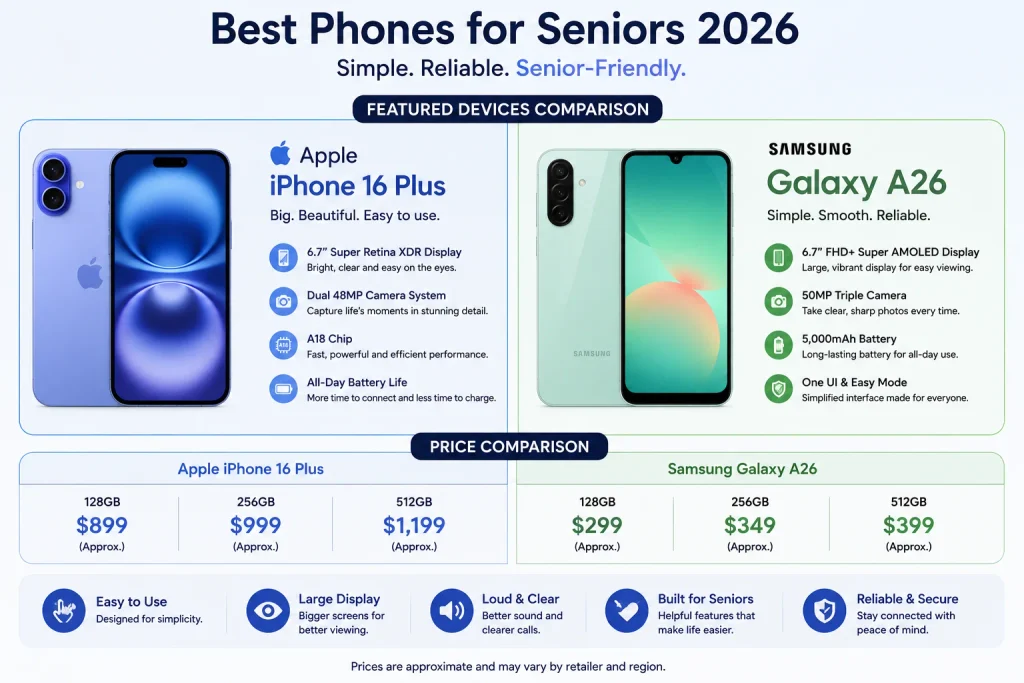
The Apple iPhone 16 Plus is the senior smartphone recommendation that requires the least qualification. The 6.7 inch display with Apple’s accessibility features which include the most comprehensive set of vision, hearing, and motor accessibility options available on any consumer smartphone combined with the simplicity and consistency of iOS makes the iPhone the phone that seniors adapt to most successfully when transitioning from a basic phone to a smartphone.
The iPhone 16 Plus runs iOS 18 with an accessibility menu that can be set up in minutes to display larger text across every app, increase display contrast for easier reading, enable spoken notifications, connect to hearing aids through Made for iPhone certification, and activate emergency SOS with a side button press or automatic detection. No Android phone matches the depth and ease of iOS accessibility settings.
The 6.7 inch display at 460 PPI with up to 2000 nits brightness stays fully readable in outdoor daylight without requiring the user to shade the screen or squint. The titanium frame gives it a solid, premium feel that is easy to grip. Face ID unlocks the phone by simply looking at it removing the need for a PIN or pattern that seniors frequently forget or struggle to type.
The iPhone 16 Plus starts at $899 in the United States. For seniors on a tight budget, the iPhone 15 Plus at a reduced price or a refurbished iPhone 14 Plus provides the same accessibility depth at a lower cost.
Samsung Galaxy A26 5G — Best Android Option for Seniors
For seniors who prefer Android or whose families are Android users, the Samsung Galaxy A26 5G delivers the best combination of large display, One UI simplicity, and long-term software support at a price that respects a fixed income. Samsung’s One UI Easy Mode available in Settings transforms the interface into a simplified layout with larger icons, larger text, and a reduced number of on-screen options that removes the overwhelming complexity that standard Android presents to new smartphone users.
The 6.7 inch Super AMOLED display at 120Hz with Samsung’s automatic brightness adjustment keeps text readable across different lighting environments. The dedicated microSD slot allows storage expansion without navigating cloud storage settings. The six-year software update commitment means a senior who receives this phone today will not need to learn a new device for years.
The side-mounted fingerprint sensor is significantly more reliable for seniors with arthritis or dry skin than under-display optical sensors that require precise finger placement pressure. The dedicated microSD slot means family members can load music, photos, and videos onto a card rather than explaining cloud services.
Doro 8100 — Best Dedicated Senior Phone
The Doro 8100 is designed specifically for older adults rather than adapted from a mainstream smartphone, and the difference shows in every aspect of the experience. The physical buttons are larger than standard smartphone buttons. The display font is large by default. The back of the phone has a dedicated emergency button that connects to a preset list of contacts and sends them a message with the user’s GPS location when pressed.
Doro’s interface is simplified to show only the essential features most seniors use calls, messages, contacts, and a camera without the app drawer, notification shade complexity, or settings menu depth that mainstream smartphones present. For seniors who feel genuinely overwhelmed by modern smartphones and want a phone that feels familiar to the mobile phones they used before touchscreens became universal, the Doro 8100 is the most considerate design available.
The 4G LTE connectivity and 2800 mAh battery are modest by mainstream standards. The Doro 8100 is not a performance device. It is a communication device and as a communication device that makes calling, messaging, and emergency alerting as simple and reliable as possible, nothing in its category matches it.
Best Phone Plans for Seniors in 2026
Consumer Cellular — Best Overall Senior Plan
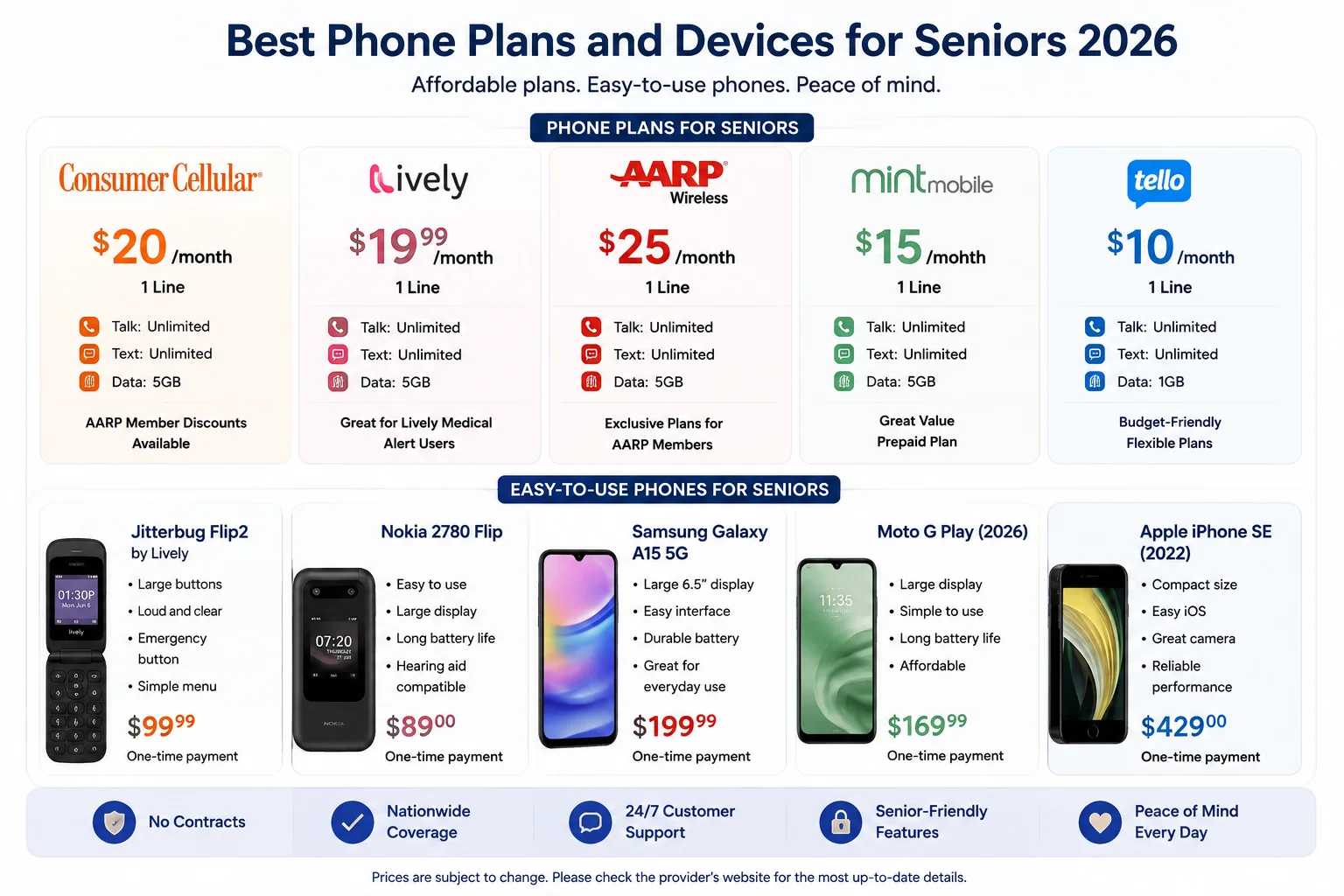
Consumer Cellular has been built around the senior market since its founding and every aspect of the service reflects that focus. Plans start at $20 per month for talk and text and scale up through data tiers that seniors can adjust at any time including the ability to call and change your plan mid-month without penalty if you realize you are using more or less data than expected.
The AARP member discount reduces Consumer Cellular plans by five percent for AARP cardholders, making an already affordable service meaningfully cheaper for seniors who are AARP members. Customer service is available by phone with agents who are specifically trained to assist older adults patiently and clearly — the kind of customer service experience that mainstream carriers have largely abandoned in favor of automated systems and chat.
Consumer Cellular operates on AT&T and T-Mobile networks, providing reliable coverage across most of the United States including rural areas where many older adults live. The plan structure is honest no hidden fees, no unexpected contract changes, and no confusing bundle requirements.
T-Mobile Magenta 55 Plus — Best Value for Heavy Users
For seniors who use their phones more extensively video calling with grandchildren, streaming music, GPS navigation, and regular social media the T-Mobile Magenta 55 Plus plan delivers unlimited talk, text, and data for two lines at $70 per month when both account holders are 55 or older. This is significantly cheaper than equivalent unlimited plans from AT&T and Verizon for the same usage level.
T-Mobile’s network has expanded aggressively in recent years and now provides strong 4G LTE and growing 5G coverage in most urban and suburban areas of the United States. The plan includes Netflix Basic at no additional cost a streaming benefit that many seniors use regularly for entertainment.
The 55 Plus requirement means both lines on the account must be held by people 55 or older, which makes this ideal for senior couples or two senior siblings sharing a family plan.
Verizon Senior Plan — Best Network Coverage
For seniors who live in rural areas or who travel frequently to less populated regions, Verizon’s network coverage remains the broadest and most reliable in the United States. Verizon’s 55 Plus plans provide unlimited talk and text with tiered data options starting at $60 per month for one line.
The reliability premium is real in areas where T-Mobile and AT&T coverage becomes spotty, Verizon frequently maintains a stable connection. For a senior who lives alone in a rural area and relies on their phone for emergency contact capability, the network coverage guarantee that Verizon provides justifies the higher cost compared to Consumer Cellular or T-Mobile.
Straight Talk — Best Prepaid Option
For seniors on tight fixed incomes who want to avoid any possibility of an unexpected monthly bill, Straight Talk’s prepaid plans provide unlimited talk and text with data options starting at $35 per month with no contract, no credit check, and no bill. You pay for exactly what you want, when you want it, with no possibility of overage charges or contract penalties.
Straight Talk operates on all four major US networks Verizon, AT&T, T-Mobile, and Dish — and assigns your phone to the best available network for your area when you activate. This means rural seniors often get Verizon coverage at Straight Talk prices.
Features That Matter Most for Senior Phone Safety
Emergency SOS is the feature that every senior’s phone should have configured on day one. On iPhone, pressing the side button five times quickly or holding the side button and volume button together — automatically calls emergency services and sends the user’s location to designated emergency contacts. On Android, a similar function is available in Settings under Emergency SOS. Setting this up takes five minutes and can be genuinely lifesaving.
Fall detection is available on the Apple Watch Series 6 and newer when paired with an iPhone, and on some Android wearables. For seniors who live alone, pairing a phone with a fall-detecting wearable creates an automatic emergency response system that operates even when the senior cannot physically reach their phone to make a call.
Medical ID is an iPhone feature that stores emergency medical information blood type, medications, allergies, medical conditions, and emergency contacts — on the lock screen where first responders can access it without unlocking the phone. Setting up Medical ID takes less than ten minutes and provides first responders with critical information during a medical emergency when the senior cannot communicate. Android phones have a similar feature in the Emergency Information section of the Health app.
Large text and display magnification are accessibility features that most guides mention but few explain how to set up. On iPhone, go to Settings, then Accessibility, then Display and Text Size. Increasing the font to the third-largest size and enabling Bold Text covers most readability needs. On Android, go to Settings, then Accessibility, then Font Size and Display Size to increase both simultaneously.
Hearing aid compatibility through Bluetooth is available on all current iPhone models with Made for iPhone hearing aid support, meaning properly paired hearing aids receive phone audio directly through the Bluetooth connection rather than through the earpiece speaker. The practical result is dramatically clearer call audio for seniors who use compatible hearing aids.
How to Set Up a Senior’s Phone Correctly
Setting up a phone for an older adult relative is a specific process that takes about an hour and makes an enormous difference in how successfully they adopt the new device.
Start with the display settings before anything else. Increase font size to the largest comfortable level, increase display brightness to automatic, enable bold text, and turn on auto-rotate lock so the screen stays in portrait mode during calls. These four changes solve the majority of readability complaints that seniors have with smartphones.
Set up emergency contacts in both the phone’s emergency contacts section and the carrier’s account. Add at least two family members or close friends as emergency contacts. If the senior has an iPhone, complete the Medical ID setup and verify that Emergency SOS is configured correctly by calling 911 from the Medical ID screen the screen that appears when someone swipes the lock screen to confirm the contacts are correct before a real emergency makes it relevant.
Install only the apps the senior will actually use. The home screen of a senior’s phone should have the phone app, messages, camera, video calling whether FaceTime, WhatsApp, or Google Duo contacts, weather, and any specific apps they have expressed interest in. Every additional app on the home screen increases confusion and the likelihood that the senior accidentally launches an app they do not recognize and cannot exit.
Create a one-page physical reference card with the three or four most common actions the senior will perform how to make a call, how to send a message, how to take a photo, and how to video call specific family members. Laminate it and keep it next to the phone. This reduces the number of help calls from the senior by fifty percent in the first month after setup.
Common Mistakes Families Make When Choosing a Senior Phone
Buying the most advanced phone available is the most common mistake. A 200 MP camera and an AI assistant are features that add complexity without adding value for most older adults. The best phone for a senior is the simplest phone that meets their actual communication needs not the phone with the highest specifications.
Choosing a plan with more data than the senior needs creates unnecessary expense. Most seniors who use their phone for calls, texts, and occasional web browsing use less than 2GB of data per month. A plan with 5GB or unlimited data costs significantly more than a 2GB plan for no functional benefit at that usage level.
Skipping the setup session is the other major mistake. Handing a senior an unboxed phone and telling them to figure it out guarantees frustration and phone abandonment within two weeks. The one-hour setup session described above is not optional it is the difference between a senior who successfully uses their phone for years and one who puts it in a drawer after a month.
Not reviewing the plan annually is a less obvious mistake with real financial consequences. Carrier senior plan pricing changes every year and new competitive options appear regularly. A plan that was the best value two years ago may now be $20 per month more expensive than a current competitor for identical service. Reviewing and potentially switching plans once per year can save a senior $200 to $300 annually.
Frequently Asked Questions
Q: What is the easiest smartphone for seniors to use?
The Apple iPhone 16 Plus is consistently rated the easiest smartphone for seniors to use because of the depth and accessibility of iOS accessibility settings, the consistency of the interface across all apps, and the Face ID unlock that eliminates the need to remember a PIN. For seniors who specifically prefer Android, the Samsung Galaxy A26 5G with One UI Easy Mode enabled is the most senior-friendly Android option available.
Q: What is the cheapest phone plan for seniors?
Consumer Cellular offers plans starting at $20 per month for talk and text, making it the cheapest reliable phone plan available specifically designed for seniors. For seniors who are AARP members, the five percent discount reduces this further. Straight Talk’s prepaid plans start at $35 per month with no contract and provide a reliable no-surprise-bill alternative for seniors on fixed incomes.
Q: Do seniors need a 5G phone?
Not urgently, but buying a 5G-capable phone in 2026 makes sense because it extends the phone’s useful life without requiring an upgrade in two to three years as 4G networks are gradually scaled back in favor of 5G in most US cities. The Samsung Galaxy A26 5G and Apple iPhone 16 Plus both include 5G at prices appropriate for senior buyers.
Q: What phones work best with hearing aids?
Apple iPhones with Made for iPhone hearing aid support provide the clearest Bluetooth audio integration with compatible hearing aids, routing phone call audio directly through the hearing aids rather than the phone speaker. Most major hearing aid brands including Phonak, ReSound, Starkey, and Widex offer iPhone-compatible models. For Android, select Samsung Galaxy phones offer direct streaming to compatible hearing aids through the Samsung Hearing Aid service.
Q: How do I set up emergency contacts on a senior’s phone?
On iPhone, open the Health app, tap your profile picture, and select Medical ID. Add emergency contacts and complete all medical information fields. On Android, go to Settings, then Safety and Emergency, then Emergency Information. Both platforms make this information accessible from the lock screen without unlocking the phone.
Q: What features should a senior phone have for someone living alone?
Seniors living alone specifically benefit from emergency SOS with automatic emergency contact notification, GPS location sharing with family members, fall detection through a paired wearable, Medical ID accessible from the lock screen, long battery life of at least two days, and a large bright display for reliable readability during an emergency call. The Apple iPhone 16 Plus paired with an Apple Watch covers all of these features in one ecosystem.
Q: Are flip phones still a good option for seniors?
Traditional flip phones have largely been replaced by smartphones in terms of value, but seniors who genuinely prefer physical buttons and a compact form factor when closed can consider the Motorola Moto Razr 50 or Samsung Galaxy Z Flip 6 as flip-style smartphones that combine touchscreen capability with the satisfying close of a physical flip mechanism. These are not simplified devices — they are full smartphones in a flip form factor and carry a significant price premium over standard smartphones.
Final Verdict
Choosing the best phone plan and device for a senior in 2026 comes down to honest prioritization over marketing-driven feature chasing. The seniors who thrive with their smartphones are the ones whose families took the time to choose a device that matches real daily needs rather than the device with the most impressive specifications, configured it properly with accessibility features activated and emergency contacts set up, and selected a plan that costs only what their actual usage requires.
The Apple iPhone 16 Plus with a Consumer Cellular or T-Mobile 55 Plus plan is the combination that serves most seniors best across the full range of daily communication, safety, and entertainment needs. The Samsung Galaxy A26 5G with One UI Easy Mode is the best Android alternative for families in the Android ecosystem. The Doro 8100 is the right recommendation for seniors who want a simpler, more focused device without the complexity of a full smartphone.
Whatever device and plan you choose, the one-hour setup session with the senior present, the physical reference card left beside the phone, and the annual plan review are the three practices that turn a good device choice into a genuinely successful long-term outcome for the older adult you are helping.